
How to Add the Supabase MCP Server to Claude Code
One command connects Supabase to Claude Code through the hosted MCP server: OAuth or a personal access token, project scoping, read-only mode, and the tools to allowlist.
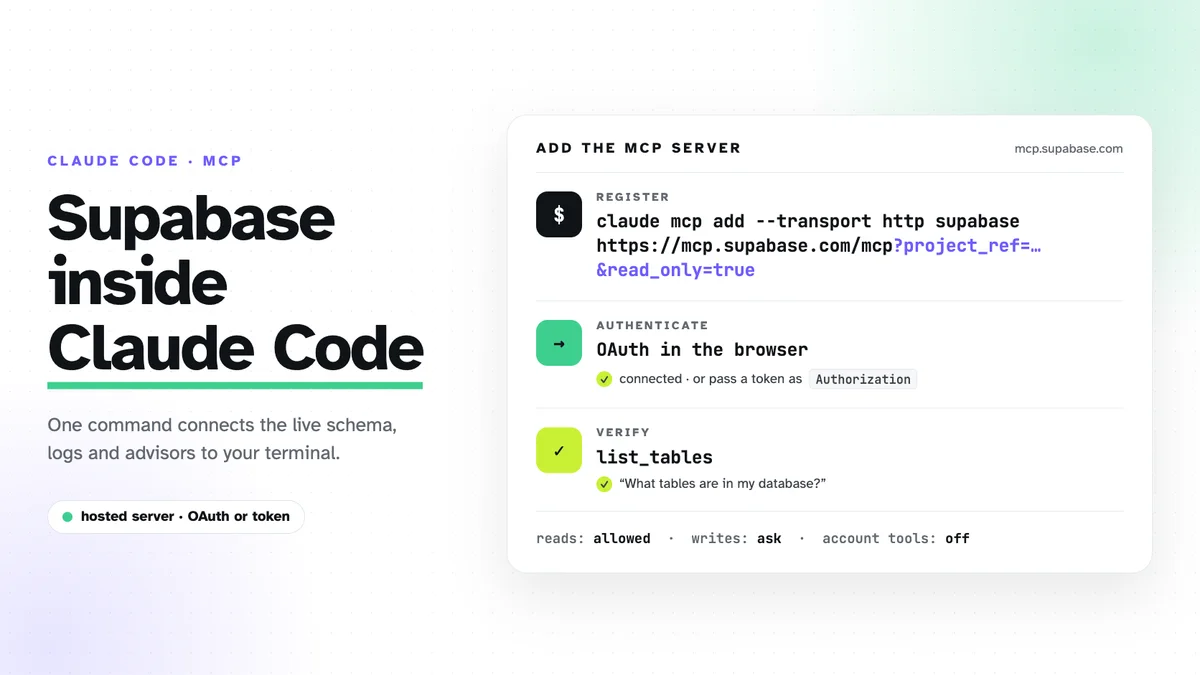
Supabase runs a hosted MCP server at https://mcp.supabase.com/mcp, and
Claude Code can talk to it after one command. Nothing is installed locally.
This is the short version: the command, the two ways to authenticate, the
three URL parameters that keep it safe, and the permission rules I use. It is
the Supabase half of the three-server setup
behind Council; the RevenueCat half has
its own post.
Add the server
claude mcp add --scope project --transport http supabase \
  "https://mcp.supabase.com/mcp?project_ref=<your-project-ref>&read_only=true"
--scope project writes the entry into .mcp.json at the repository root,
so every session in that repo, and every teammate, gets the same server.
That is fine here because the URL carries no secret. The file it produces:
{
  "mcpServers": {
    "supabase": {
      "type": "http",
      "url": "https://mcp.supabase.com/mcp?project_ref=<your-project-ref>&read_only=true"
    }
  }
}
The project ref is the short id in your Supabase dashboard URL,
https://supabase.com/dashboard/project/<your-project-ref>.
OAuth or a personal access token
OAuth is the default. The hosted server uses dynamic client
registration, so there is no OAuth app to create and no token to store. Run
/mcp inside Claude Code, pick supabase, choose Authenticate, and a
browser window asks you to sign in and select the organization that owns the
project. Supabase’s docs say to do this from a regular terminal rather than
an IDE extension; that matched my experience.
A personal access token is for CI and for clients without OAuth support.
Create one at https://supabase.com/dashboard/account/tokens, scope it to
the project, and pass it as a header:
claude mcp add --transport http supabase \
  "https://mcp.supabase.com/mcp?project_ref=<your-project-ref>&read_only=true" \
  --header "Authorization: Bearer sbp_..."
Drop --scope project on this variant. That scope writes .mcp.json, which
is meant to be committed, and the token would go with it.
Supabase also publishes @supabase/mcp-server-supabase on npm for
self-hosting and the AI SDK, but the hosted server is what the docs describe
for Claude Code, so that is where I would start.
Three parameters worth setting
project_refscopes the server to one project and turns off the account tools (list_projects,create_project,pause_project). Without it the assistant can see every project in the organization. I work on several products from neighbouring folders, so this is the difference between access to one database and access to all of them.read_only=trueruns every query as a read-only Postgres user. Writes fail at the database, not at the prompt.featureslimits the tool groups, comma-separated:features=database,docs,debuggingis enough for most sessions.
Check that it works
Ask for something that only reads:
What tables are in my database, and is there an index on
anon_id?
Claude Code should call list_tables and answer from the live schema. If
it answers from a migration file instead, the server is not connected, and
/mcp shows why.
What it can do
| Group | Example tools | Default |
|---|---|---|
| Database | list_tables, list_migrations, apply_migration, execute_sql |
on |
| Debugging | query_logs, get_advisors |
on |
| Development | get_project_url, get_publishable_keys, generate_typescript_types |
on |
| Edge Functions | list_edge_functions, deploy_edge_function |
on |
| Docs | search_docs |
on |
| Account | list_projects, create_project, get_cost |
off with project_ref |
| Branching | create_branch, merge_branch |
experimental, paid plans |
| Storage | list_storage_buckets, update_storage_config |
off |
On Council the group that paid off most was Debugging. get_advisors flags
tables without row-level security policies, and query_logs is how I traced
a RevenueCat webhook that was failing in production: the error was in the
Postgres log, not in the application log. The second winner is drift
checking: asking whether the deployed schema still matches the migration
files catches the kind of mistake I used to find only when I was already
suspicious.
Allowlist the reads, keep the writes asking
MCP tools go through Claude Code’s normal permission system. Council’s
.claude/settings.json lets the read-only tools run without a prompt:
{
  "permissions": {
    "allow": [
      "mcp__supabase__list_tables",
      "mcp__supabase__list_migrations",
      "mcp__supabase__get_advisors",
      "mcp__supabase__search_docs"
    ]
  }
}
execute_sql and apply_migration still prompt, even in read-only mode. I
want to see the query before it runs.
Do not point it at production without read-only
The server acts with your developer permissions, so it is an internal tool,
never something an end user talks to. Two habits follow from that. For
interactive work, connect to production only when the task needs it, with
project_ref and read_only=true set, and keep manual approval on for
anything that writes. For unattended routines, pre-approve only read-only,
project-scoped tools and have them report recommendations rather than apply
changes. The reason is prompt injection: text the assistant reads, a support
ticket or a row in a table, can try to talk it into running a query. The
read-only Postgres user is the backstop when the prompt is not.
Schema changes go on a development branch first, or on a separate project, and reach production as a migration you reviewed.